The best walking pads for office use make it easier to add low-impact movement to your workday without giving up valuable floor space. The models in this roundup emphasize compact designs, quiet operation, useful speed controls, and features that support desk-based walking.
Whether you need a slim mat for calls, an incline model for more challenging sessions, or a higher-capacity option, this guide highlights the factors that matter most before you buy.
Best 10 Walking Pads for Office Picks for 2026
Best Incline Value
Compact 5% Incline Walking Pad

- Manual 5% incline
- Lightweight, no assembly
- Non-slip shock-absorbing belt
Best For: Office users wanting compact inclined walking
Best for Heavy-Duty Desk Walking
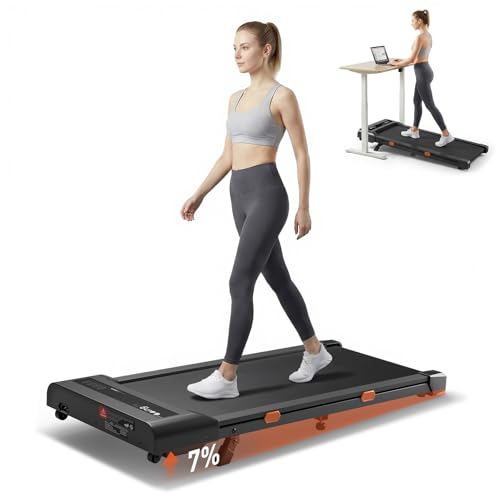
- 300-pound weight capacity
- Bosch motor with 0.6–4 mph range
- App and remote controls
Best For: Users needing a sturdy connected desk treadmill
Best With Handles

- Sturdy foldable handles
- Adjustable 4-degree incline
- LED display and quiet operation
Best For: Users wanting support and compact storage
Best Heavy-Duty Incline

- 450-pound capacity
- Nine-level incline up to 12%
- App, Bluetooth speaker, and 3-year warranty
Best For: Users wanting robust incline training and tracking
Best Quiet Compact Pick
Slim Walking Pad for Home Office

- 45 dB quiet motor
- 4.0 MPH top speed
- Slim, wheeled design
Best For: Quiet desk walking in compact home-office spaces
Best Heavy-Duty Pick

- 450-pound capacity
- Nine incline levels up to 12%
- FitYo app and Bluetooth audio
Best For: Higher-capacity users wanting incline and connected workouts
Best for Comfort

- 8% manual incline
- 0.5–4.0 MPH speed range
- 34-pound wheeled design
Best For: Compact office walking with occasional incline training
Best Quiet Incline Pick

- 6% incline with speeds up to 3.8 MPH
- Under-45dB, 2.5 HP motor
- 300-lb capacity and 4.5-inch profile
Best For: Quiet office walking with app-guided workouts
Best High-Capacity Option

- Up to 6.2 MPH with 9% manual incline
- 330-lb capacity and 2.75 HP motor
- 12 programs and under-40dB operation
Best For: Desk walking plus jogging and running workouts
Best Lightweight Compact Pick
8% Incline Under Desk Treadmill

- 28.7-pound portable design
- 8% manual incline and up to 4 MPH
- Six-layer cushioning with under-45dB motor
Best For: Small spaces and lightweight office walking
Best Incline Value – Compact 5% Incline Walking Pad
If you want walking pads for office use with a little extra challenge, this compact model adds a manually adjustable 5% incline while keeping the design lightweight and easy to store. Its 1–6 km/h speed range suits desk walking and brisk walking.
Best For: Office users who want a lightweight, no-assembly walking pad with a manual incline.
Pros:
- Manual 5% incline adds workout intensity.
- Lightweight 16.25 kg design requires no assembly.
- Five-layer non-slip belt and shock-absorbing construction support comfortable walking.
- Compact body can fit beneath furniture for storage.
Cons:
- Incline adjustment is manual rather than automatic.
- Top speed is limited to 6 km/h, making it better for walking than running.
- The listed running deck is relatively compact at 38 × 90 cm.
This is a practical choice when storage space matters and you want more than flat walking. The quiet motor, textured belt, and compact footprint make it suitable for light movement during the workday.
Best for Heavy-Duty Desk Walking – Cybergoing T10 Walking Pad
The Cybergoing T10 is one of the more capable walking pads for office use if user capacity and controlled speed matter. Its Bosch motor, 300-pound weight capacity, app connectivity, and 0.6–4 mph range are suited to steady daily walking beneath a desk.
Best For: Users who want a sturdy under-desk treadmill with app and remote speed control.
Pros:
- Supports users up to 300 pounds.
- Bosch motor is designed for steady performance.
- App and remote control provide convenient speed adjustments.
- Fixed 7% manual incline adds challenge without a bulky treadmill frame.
Cons:
- The 7% incline is fixed and must be set before use.
- The 15 × 36-inch belt offers less stride room than larger treadmills.
- Maximum speed is 4 mph, limiting faster running.
Choose the T10 if a higher weight capacity and connected controls are more important than a full-size deck. Its slim, no-handrail design keeps it practical for a home office setup.
Best With Handles – Foldable Incline Walking Pad
For shoppers comparing walking pads for office use, this model stands out with sturdy handles, a foldable design, and a manually adjustable 4-degree incline. Its 0.6–3.8 mph speed range and central LED display make it suited to controlled walking at home or during office breaks.
Best For: Users who prefer added handle support, simple workout feedback, and easy storage.
Pros:
- Handles provide additional support and safety.
- Adjustable 4-degree manual incline helps increase workout intensity.
- LED display tracks time, distance, speed, and calories.
- Listed 45 dB operation is designed for quieter use.
Cons:
- Maximum speed is 3.8 mph, so it is primarily a walking machine.
- Manual incline requires adjustment rather than one-button control.
- Handles may make it less convenient to position fully under a desk.
This is a sensible pick for users who value stability and storage flexibility over a completely handle-free design. The folding format and quiet operation suit smaller homes and shared spaces.
Best Heavy-Duty Incline – 12% Auto-Incline Walking Pad
This walking pad is a strong option for office users who want more challenging, adjustable workouts. It combines a nine-level auto incline reaching 12%, a 450-pound capacity, a 41-inch deck, and app features while retaining a compact under-desk form.
Best For: Users seeking high weight capacity, automatic incline adjustment, and workout tracking.
Pros:
- Nine-level automatic incline adjusts up to 12%.
- Reinforced frame supports up to 450 pounds.
- FitYo app supports workout tracking, data syncing, and coach-led courses.
- Triple cushioning, a five-layer belt, and Bluetooth speakers add comfort and convenience.
Cons:
- Maximum speed is 4 mph, limiting running pace.
- Its heavier-duty construction may be less portable than lighter walking pads.
- The incline and connected features may be more than needed for basic desk walking.
If you need a walking pad that can handle higher user weight and steeper training, this model offers the most substantial feature set in the group. The three-year warranty also provides longer stated coverage than the other listed options.
Best Quiet Compact Pick – Slim Walking Pad for Home Office
If you want walking pads for office use that stay simple and unobtrusive, this compact model focuses on easy controls, quiet operation, and convenient storage. Its 0.6–4.0 MPH range supports desk walking, brisk walking, and light running, while the remote lets you adjust speed without interrupting your routine.
Best For: Home-office users who prioritize a slim, quiet, easy-to-move walking pad.
Pros:
- Quiet 2.0 HP motor is rated at 45 decibels.
- Ultra-thin 4-inch profile and wheels simplify storage.
- Remote control and one-button startup make operation straightforward.
- Five-layer belt and honeycomb cushioning provide impact absorption.
Cons:
- Its 38 × 90 cm deck is relatively compact for running.
- It does not offer incline adjustment.
- The supplied details list a one-year warranty.
This is a practical choice for light, consistent movement during office hours, especially where noise and storage space matter more than advanced training features.
Best Heavy-Duty Pick – Auto-Incline Walking Pad
For shoppers seeking walking pads for office use with extra stability and training flexibility, this heavy-duty model stands out with a reinforced steel frame, 450-pound capacity, and nine-level automatic incline. It reaches up to 5.0 MPH and adds Bluetooth app tracking and speaker support for more engaging workouts.
Best For: Users who need a high-capacity walking pad for walking, jogging, or incline training at home or in an office.
Pros:
- 450-pound maximum user weight recommendation supports a broad range of users.
- Automatic incline offers nine levels up to 12%.
- Bluetooth connects with the FitYo app and supports Apple Health and Google Fit syncing.
- Includes a three-year warranty and 24/7 human support.
Cons:
- At 43 pounds, it is substantially heavier than compact walking pads.
- The 5.0 MPH maximum is better suited to walking and light running than fast running.
- Calorie readings are sensor-based estimates rather than individualized measurements.
This is the most feature-rich and stable option in the group, but its heavier build may be less convenient if you need to move the treadmill frequently.
Best for Comfort – Abonow Under-Desk Walking Pad
This Abonow model is a useful middle ground for walking pads for office use, combining a compact footprint with an 8% manual incline and speeds from 0.5 to 4.0 MPH. Its LED display, remote control, shock absorbers, and wheels support regular desk walking while keeping the design manageable for smaller rooms.
Best For: Office walkers who want a compact machine with basic incline capability and occasional jogging speeds.
Pros:
- Manual incline reaches 8% for more demanding walking sessions.
- Five-layer anti-slip belt and six silicone shock absorbers add cushioning.
- Wheeled 34-pound design is easy to move and store.
- Dedicated working, walking, and running modes cover several use cases.
Cons:
- The incline is manual rather than automatic.
- Its 265-pound capacity is lower than the heavy-duty alternative.
- It is not foldable, despite its compact wheeled design.
Choose this model if you want more challenge than a flat walking pad provides without moving up to a larger, heavier treadmill with automatic incline.
Best Quiet Incline Pick – MJWW 6% Incline Walking Pad
If you want walking pads for office use that can support focused work and more challenging workouts, the MJWW combines a 6% incline with speeds from 0.6 to 3.8 MPH. Its under-45dB motor, slim profile, and remote or app controls make it practical for a home office.
Best For: Users who want a quiet walking pad with incline, app features, and a 300-pound capacity.
Pros:
- 6% incline and 0.6–3.8 MPH speed range support workday walking and faster cardio.
- Under-45dB operation is suited to calls and shared spaces.
- Zero assembly, transport wheels, and a 4.5-inch profile simplify storage.
- PitPat app includes adaptive plans, voice guidance, and safety alerts.
Cons:
- Its 3.8 MPH maximum is geared more toward walking than running.
- The incline is built into the design rather than presented as an adjustable setting.
The MJWW is a strong all-around option when quiet operation, compact storage, and a modest incline matter more than running speed.
Best High-Capacity Option – CHAOKE 9% Incline Walking Pad
The CHAOKE is one of the more versatile walking pads for office and home use, with speeds up to 6.2 MPH, a 9% manual incline, and 12 preset programs. Its under-40dB motor and shock-absorbing belt help it transition from desk walking to more intense training.
Best For: Users who want higher speed, a stronger incline, and a 330-pound weight capacity in one compact treadmill.
Pros:
- Supports walking, jogging, and running at speeds from 1 to 6.2 MPH.
- 9% manual incline adds intensity for hill-style workouts.
- Under-40dB operation and cushioning suit home-office use.
- Includes 12 programs, zero assembly, transport wheels, and a magnetic safety key.
Cons:
- The 9% incline is manual, so it requires physical adjustment.
- Its 95 × 38 cm belt may feel less spacious for running than a full-size treadmill.
Choose the CHAOKE if you need a walking pad that can handle more than slow desk walking. It offers the broadest training range here, though its manual incline and compact belt are worth considering.
Best Lightweight Compact Pick – 8% Incline Under Desk Treadmill
For small offices and apartments, this compact model keeps the focus on portability and simple desk walking. It offers an 8% manual incline, speeds from 0.6 to 4 MPH, and a 28.7-pound frame that can slide under furniture when not in use.
Best For: Apartment and home-office users prioritizing a lightweight, space-saving walking pad.
Pros:
- Lightweight 28.7-pound design is easier to move and store.
- 8% incline adds workout intensity without requiring a full-size treadmill.
- Under-45dB motor supports quieter office use.
- Six-layer cushioning and a 15 × 35.4-inch belt provide shock absorption.
Cons:
- Its 265-pound capacity is lower than the other listed models.
- The 4 MPH maximum is intended for walking and light jogging rather than running.
- The incline is manual.
This is a sensible choice when storage and portability are the deciding factors. Its modest speed ceiling and lower capacity make it less suitable for users seeking vigorous running sessions.
How We Picked the Best Walking Pads for Office Use
We focused on features that affect everyday desk walking rather than headline specifications alone. The selected models were compared by footprint, portability, stated weight capacity, speed range, incline capability, motor design, controls, and noise-focused features. We also considered how practical each machine is for small home offices, including whether it can slide under furniture and be moved without much effort.
Because product specifications can vary by seller and configuration, check the current listing for exact dimensions, warranty terms, assembly requirements, and supported user weight before ordering.
Quick Comparison
For straightforward office walking, prioritize a slim, quiet model with simple remote controls. Incline versions are better for users who want more intensity, but they may be heavier, taller, or less convenient to store. Higher-capacity models can offer a sturdier deck, while compact options are generally easier to position beneath a standing desk.
| Priority | Look for | Best suited to |
|---|---|---|
| Quiet desk use | Low-noise motor and stable belt | Calls, focus work, and shared spaces |
| More intensity | Automatic or fixed incline | Users wanting greater effort at walking speeds |
| Easy storage | Slim profile, wheels, and manageable weight | Small offices and multipurpose rooms |
| Added stability | Wide deck and higher weight rating | Larger users or less confident walkers |
Key Buying Factors for Walking Pads for Office
Noise and Desk Compatibility
A quiet motor helps keep meetings and concentration sessions uninterrupted, but belt noise and footfalls also matter. Use the pad on a firm, level surface with an appropriate mat, and confirm that your desk has enough clearance for comfortable posture.
Speed Controls and Safety
Remote controls are useful when the display is under a desk. Look for gradual speed adjustment, an emergency stop or safety mechanism where available, and a belt wide enough to let you walk naturally. Most office users should choose a model designed primarily for walking rather than running.
Incline, Capacity, and Size
Incline can increase workout difficulty without requiring high speed, but it may add height and reduce storage convenience. Select a stated capacity comfortably above your body weight, then verify the deck dimensions. A longer or wider belt is usually more forgiving during extended sessions.
Maintenance and Portability
Check whether the belt requires periodic lubrication and whether replacement parts or service information are accessible. Wheels, a slim frame, and a reasonable machine weight make it easier to move between a desk and storage area.
Who Should Buy Which Walking Pads for Office?
Choose a compact, low-profile model if your main goal is light walking during email, reading, or video calls. Pick an incline model if you want to increase effort while maintaining a moderate pace. A higher-capacity treadmill is the better choice when stability and deck support matter more than minimum size. If you plan to alternate walking and faster workouts, select a model with a suitable top speed and a frame that remains stable outside desk use.
Before purchasing, measure the available space, confirm desk clearance, review the return policy, and account for the machine’s weight. The best Walking Pads for Office routines are the ones you can set up easily, use consistently, and store without disrupting your workspace.