The best document camera for teachers makes it easier to demonstrate worksheets, books, science materials, handwriting, and hands-on projects in real time. The right model should produce a clear image while fitting smoothly into your classroom technology setup.
We selected 10 options ranging from compact USB cameras to higher-resolution models with flexible positioning, built-in lighting, microphones, and HDMI connectivity. Use the guide below to narrow your choice by teaching style, workspace, and budget.
Best 10 Document Camera for Teachers Picks for 2026
Best Overall
IPEVO V4K 8MP USB Document Camera
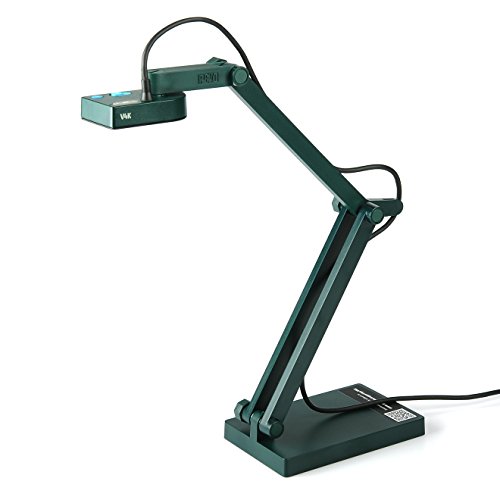
- 8MP resolution up to 3264 × 2448
- 30 fps Full HD streaming
- Mac, Windows, and Chromebook compatible
Best For: Everyday classroom demonstrations and remote teaching
Best for Large Materials
INSWAN INS-2 4K Document Camera

- 13MP 4K capture at 30 fps
- Supports documents and artwork up to A3
- Includes lighting, autofocus, OCR, and annotation tools
Best For: Art instruction and large classroom presentations
Best for Direct Projection
IPEVO VZ-R HDMI/USB Document Camera
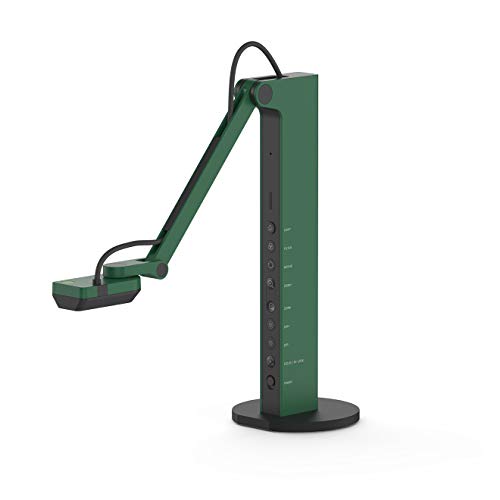
- HDMI and USB dual-mode operation
- Can work without a computer
- Built-in LED and webcam functionality
Best For: Projector-based classrooms and hybrid teaching
Best Simple Setup
Epson DC-07 1080p Document Camera

- 1080p output with 8x digital zoom
- One-touch autofocus and Freeze button
- Built-in microphone and carrying case
Best For: Basic USB lessons with Windows or Mac computers
Flexible 3-in-1 Pick
Adjustable 1080p Document Camera

- Works as a document camera, webcam, and visualizer
- Adjustable arm with image inversion and autofocus
- Five-level fill light and broad device compatibility
Best For: Teachers needing a flexible camera for demonstrations and remote lessons
High-Resolution Classroom Pick

- 8MP capture up to 2448P at 30fps
- Covers A3-size materials and 3D objects
- Foldable design with dual microphones
Best For: Teachers showing larger documents and detailed classroom demonstrations
Portable Teaching Pick

- Foldable design with 360-degree lens adjustment
- 1080p video at 30fps with manual focus
- Dual noise-reduced microphones for online lessons
Best For: Teachers needing a compact camera for mobile or remote instruction
Top 4K Pick
THUSTAR 8MP 4K Document Camera
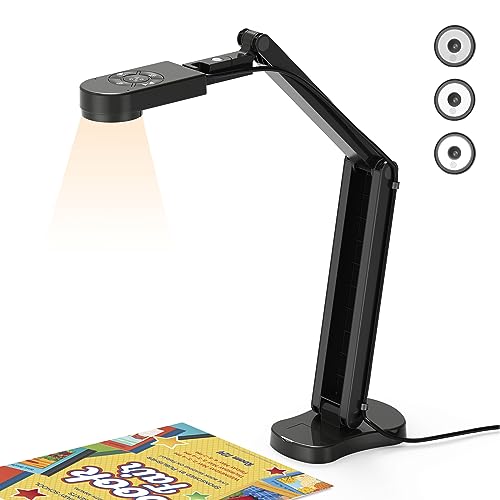
- 8MP, 2448P output at 30fps
- A3 coverage with macro focus
- Three-level LED lighting and dual microphones
Best For: High-detail classroom demonstrations and distance teaching
Best Adjustable Value
PAKOTOO 8MP A3 Document Camera

- 2448P autofocus video for A3/A4 materials
- Three-level lighting and 10 exposure levels
- Foldable design with USB-C cable
Best For: Portable classroom use with manual image and exposure controls
Best Webcam Combo

- Combines document camera and webcam modes
- A3 coverage with flexible hose-style positioning
- Three-level LEDs and five exposure settings
Best For: Teachers using one camera for lessons and video calls
Best Overall – IPEVO V4K 8MP USB Document Camera
The IPEVO V4K is a strong all-around document camera for teachers who want sharp live images, responsive autofocus, and broad computer compatibility. Its 8MP Sony CMOS sensor captures up to 3264 × 2448 resolution, while Full HD streaming can reach 30 fps for smooth demonstrations.
Best For: Teachers using Mac, Windows, or Chromebook systems for live lessons, document demonstrations, and remote teaching.
Pros:
- 8MP capture with high-resolution output up to 3264 × 2448 pixels.
- Fast autofocus and up to 30 fps streaming at Full HD.
- Multi-jointed stand and compatibility with Mac, Windows, Chromebook, and third-party software.
Cons:
- USB connectivity requires a computer for operation.
- The maximum shooting area is about 13.46 × 10.04 inches.
Choose the V4K if image clarity and smooth switching between classroom materials matter most. Its one-year warranty and adjustable stand also suit frequent daily use.
Best for Large Materials – INSWAN INS-2 4K Document Camera
The INSWAN INS-2 is a high-resolution document camera for teachers who regularly display artwork, large documents, or two-page spreads. Its 13MP Sony sensor records 4K video at 30 fps, and the flexible arm supports materials up to A3 size.
Best For: Professional educators, art instructors, exhibitions, and classrooms needing large-format capture and detailed presentations.
Pros:
- 13MP sensor captures 4K video at 3840 × 2160 and 30 fps.
- A3 capture area, built-in LED light, anti-glare sheet, and macro focus as close as 3.9 inches.
- Documate software includes annotation, recording, scanning, whiteboard tools, OCR, and zoom.
- Plug-and-play support for Windows, Mac, iPad with USB-C, and Chromebook.
Cons:
- Its larger-format design weighs 2.3 pounds.
- Compatibility depends on the listed operating-system versions and USB-C availability for iPad.
The INS-2 is a particularly capable choice when a standard letter-size camera is not enough. Its software and presentation features make it suitable for polished instruction and visual-heavy lessons.
Best for Direct Projection – IPEVO VZ-R HDMI/USB Document Camera
The IPEVO VZ-R gives teachers two connection options: HDMI for direct projection to a display and USB for computer-based lessons. It captures up to 8MP in USB mode, includes an LED light, and can also function as a webcam for video conferencing.
Best For: Classrooms that need flexible projector or monitor connections, as well as teachers who alternate between in-person and online instruction.
Pros:
- Dual HDMI and USB modes can work with or without a computer.
- Fast focus, Sony CMOS imaging, noise reduction, and color reproduction support clear demonstrations.
- Built-in LED light and tactile controls allow quick image adjustments.
- Swiveling head and multi-jointed stand support different heights, angles, and orientations.
Cons:
- HDMI cable and wall power adapter are not included.
- Maximum HDMI resolution is 1920 × 1080, lower than its USB-mode capture resolution.
The VZ-R is the practical pick for schools that want to project directly without routing everything through a computer. Confirm that you have the required HDMI cable and power adapter before using it in class.
Best Simple Setup – Epson DC-07 1080p Document Camera
Epson DC-07 Portable Document Camera with USB Connectivity and 1080p Resolution,White
Check Price On AmazonThe Epson DC-07 is a straightforward document camera for teachers who need dependable 1080p display through a USB connection. One-touch autofocus, a Freeze button, built-in microphone, and included carrying case make it convenient for lessons and recorded instruction.
Best For: Teachers who want a simple USB document camera for Windows or Mac computers and Epson projector setups.
Pros:
- 1080p output with up to 8x digital zoom.
- One-touch autofocus and a Freeze button simplify live demonstrations.
- Built-in microphone supports audio and video lesson recording.
- Includes software, USB cable, and a soft carrying case.
Cons:
- 15 fps video is lower than some newer document cameras.
- Compatibility is listed for Windows and Mac computers rather than Chromebook.
- Its 2MP sensor offers less image detail than the higher-resolution alternatives here.
The DC-07 makes sense when ease of use and familiar Epson integration matter more than maximum resolution. It is a practical option for basic document display, zooming, and recorded lessons.
Flexible 3-in-1 Pick – Adjustable 1080p Document Camera
If you need a practical document camera for teachers, this 3-in-1 model combines a document camera, webcam, and visualizer in one USB device. Its adjustable hose-style arm, autofocus button, image inversion, and five-level fill light make it adaptable for worksheets, demonstrations, video calls, and online lessons.
Best For: Teachers who want one flexible camera for classroom demonstrations, distance teaching, and video conferencing.
Pros:
- Functions as a document camera, webcam, and visualizer with up to 2592×1944P resolution.
- Adjustable arm and image inversion support varied shooting angles and mirrored video.
- Five-level fill light and touch brightness controls help in dim environments.
- USB-C connectivity works with Windows PCs, Macs, MacBooks, and Chromebooks.
Cons:
- The supplied details list 1080p video capture despite a higher maximum resolution specification.
- It has no built-in flash and is not water resistant.
This is a versatile option for educators who value positioning flexibility and simple USB setup. The built-in lighting and focus controls are particularly useful when showing materials under inconsistent classroom or home-office lighting.
High-Resolution Classroom Pick – 4K USB Visualiser
For teachers who want detailed overhead images, this 8MP USB visualiser offers up to 2448P capture at 30fps and coverage for A3-sized materials. It adds adjustable brightness, manual image reversal, a foldable multi-joint design, and dual microphones for live demonstrations and online instruction.
Best For: Teachers presenting large worksheets, books, 2D materials, and 3D objects who want higher-resolution video.
Pros:
- 8MP sensor delivers up to 2448P video at 30fps.
- Captures an area listed as up to 16.5 × 11.6 inches, suitable for A3 paper.
- Foldable, multi-joint design supports multiple angles and easier storage.
- Includes brightness controls, dual microphones, and compatibility with Windows, macOS, and Chrome OS.
Cons:
- The product title calls it 4K, while the supplied specifications list 2448P capture.
- Manual image reversal and brightness adjustments may require extra setup.
- Its listed dimensions indicate a relatively tall design when unfolded.
This model stands out when image detail and coverage matter more than the smallest footprint. Its A3 capture area and multi-angle support make it well suited to larger teaching materials and hands-on demonstrations.
Portable Teaching Pick – Gawervan 1080p USB Camera
This Gawervan model is a compact document camera for teachers designed for portable classroom and remote-teaching setups. Its foldable hose, 360-degree lens adjustment, manual focus, built-in microphones, and 1080p video make it suitable for worksheets, 3D objects, art projects, and live online discussions.
Best For: Teachers and homeschoolers who need a travel-friendly camera for live demonstrations and video meetings.
Pros:
- Combines document-camera, webcam, and visualizer functions in a foldable USB design.
- Captures 1080p video at 30fps with a 360-degree adjustable lens.
- Dual built-in microphones are designed to reduce background noise.
- Works with Windows, Mac, Chromebook, Microsoft Teams, Skype, and other listed platforms.
Cons:
- Manual focus requires the user to adjust sharpness.
- The supplied details do not list built-in lighting controls.
- Its stated video resolution is lower than the 2448P model in this roundup.
The Gawervan is a sensible choice when portability and straightforward connectivity are priorities. Manual focus can help maintain a deliberate view of teaching materials, while the foldable build keeps the setup easy to carry between locations.
Top 4K Pick – THUSTAR 8MP 4K Document Camera
The THUSTAR is a versatile document camera for teachers who need sharp live demonstrations, webcam functionality, and broad A3 coverage. Its 8MP sensor, 30fps output, autofocus button, adjustable lighting, and image-invert controls make it practical for showing documents, objects, and classroom projects.
Best For: Teachers who want high-resolution demonstrations and a foldable camera that also supports video meetings.
Pros:
- Captures up to 2448P output at 30fps with 8MP resolution.
- Supports A3-size coverage and macro shooting as close as 3.94 inches.
- Includes three LED brightness levels, manual brightness adjustment, dual microphones, and flexible positioning.
- Works with Windows, macOS, and Chrome OS, including Zoom, Teams, Google Meet, and OBS.
Cons:
- Uses a USB 2.0 connection rather than HDMI.
- Its extensive adjustment controls may be more than needed for simple document sharing.
Choose the THUSTAR when image detail and flexibility matter most. The foldable design helps with storage, while the built-in microphones and lighting make it suitable for both in-person demonstrations and distance teaching.
Best Adjustable Value – PAKOTOO 8MP A3 Document Camera
This PAKOTOO is a practical document camera for teachers who need A3 and A4 coverage, manual image reversal, and straightforward control buttons. It provides 2448P autofocus video, adjustable brightness and exposure, three-level LED lighting, and a foldable multi-joint design for classroom or remote instruction.
Best For: Teachers seeking a portable A3 document camera with manual controls and USB-C connectivity.
Pros:
- Covers documents and objects up to A3 size and focuses on items as close as 3.94 inches.
- Offers three brightness levels and 10 exposure adjustments for challenging lighting.
- Manual left-right and up-down image reversal works through the camera buttons.
- Compatible with Windows, Macs, and Chromebooks and includes a USB-C cable.
Cons:
- It is not plug and play; users must select USB Camera in the computer system.
- Does not support zoom, HDMI, or iPad compatibility.
The PAKOTOO balances useful classroom features with a compact, foldable build. It is a strong fit if you value adjustable lighting and image orientation, but confirm that your setup can work without HDMI or iPad support.
Best Webcam Combo – PAKOTOO 5MP USB Doc Camera
The PAKOTOO PA-800 combines a document camera and webcam in one flexible unit. For teachers comparing a document camera for teachers, its A3 format, hose-style positioning, autofocus, image mirroring, three-level LED lighting, and exposure controls support live lessons, presentations, webinars, and video calls.
Best For: Teachers who want one USB camera for document demonstrations, webcam calls, and distance learning.
Pros:
- Works as both a document camera and webcam, with flexible all-angle positioning.
- Supports A3-size materials and macro capture as close as 3.94 inches.
- Provides three LED light levels and five exposure adjustments.
- Compatible with Windows, macOS, Chromebooks, Zoom, Teams, Google Meet, and OBS.
Cons:
- Provides 5MP/1944P output rather than the higher resolution listed for some alternatives.
- It is not plug and play; the computer must be set to USB Camera.
- No HDMI output is listed.
The PA-800 is a sensible choice when versatility is more important than maximum resolution. Its flexible arm and webcam mode can reduce the need for separate equipment, while the lighting and exposure controls help in less-than-ideal rooms.
How We Picked the Best Document Camera for Teachers
We focused on features that matter during everyday instruction rather than specifications alone. The lineup includes models with USB connectivity for computers and Chromebooks, higher-resolution sensors for fine detail, foldable designs for storage, built-in LEDs for dim classrooms, and microphones for remote or hybrid lessons. We also considered capture area, compatibility, positioning flexibility, and how easily each camera can support live demonstrations.
Because classroom equipment varies widely, check your computer ports, operating system, presentation software, and display setup before buying. A camera that works well over USB may not offer the same direct-to-projector convenience as a model with HDMI.
Quick Comparison
| Feature | What to look for | Best suited to |
|---|---|---|
| Resolution | 1080p for standard demonstrations; 4K or 8MP for small text and detailed objects | Reading, diagrams, crafts, and close-up work |
| Connection | USB for computers; HDMI or dual-mode support for displays and projectors | Remote teaching or direct classroom projection |
| Capture area | A3 support gives more room than A4-only designs | Books, worksheets, maps, and larger projects |
| Lighting | Built-in adjustable LED illumination | Dim rooms and consistent image quality |
| Storage | Foldable arms and compact bodies | Shared classrooms or frequent transport |
Key Buying Factors for a Document Camera for Teachers
Resolution and Image Quality
Choose 1080p if you mainly display pages and larger objects. An 8MP or 4K camera can make small print, handwriting, diagrams, and texture easier to see, particularly when students view the feed on a large screen.
Compatibility and Connections
USB is usually the simplest choice for Zoom, Google Meet, video conferencing, and classroom software. Chromebook, macOS, and Windows compatibility can vary by application, so confirm support for your specific setup. HDMI is useful when you want to connect directly to a projector or monitor without routing video through a computer.
Positioning, Lighting, and Sound
A flexible arm helps you frame both flat documents and three-dimensional objects. Adjustable LEDs are valuable for shadows and uneven lighting. Built-in microphones can support online teaching, but they should not automatically replace a dedicated classroom microphone if audio clarity is critical.
Ease of Use
Look for straightforward controls, image rotation or inversion, quick autofocus, and a stable base. Foldable models are easier to store, while a larger A3 capture area reduces the need to reposition oversized materials.
Who Should Buy Which Document Camera for Teachers?
For Most Computer-Based Classrooms
Choose a USB model with dependable autofocus, broad operating-system support, and at least 1080p resolution. This is the most practical format for teachers presenting through classroom software.
For Detailed Demonstrations
Select an 8MP or 4K camera with adjustable lighting and an A3 capture area if you regularly show fine print, artwork, science specimens, or small objects.
For Projectors and Flexible Setups
A dual-mode USB/HDMI model is worth considering when you switch between direct projection, computer lessons, and remote teaching. It offers more connection options than a basic webcam-style document camera.
For Shared or Mobile Classrooms
Prioritize a compact, foldable design with simple controls. A lighter camera is easier to move between rooms and less likely to become difficult to store after each lesson.