The best document camera for classroom teaching makes worksheets, textbooks, experiments, and handwritten explanations easy to share on a larger display. The right model should deliver a clear image without slowing down lessons.
We compared these 10 options by resolution, capture area, lighting, microphone features, connectivity, flexibility, and compatibility with common classroom devices.
Best 10 Document Camera for Classroom Picks for 2026
Best Overall
IPEVO V4K 8MP Ultra HD Document Camera
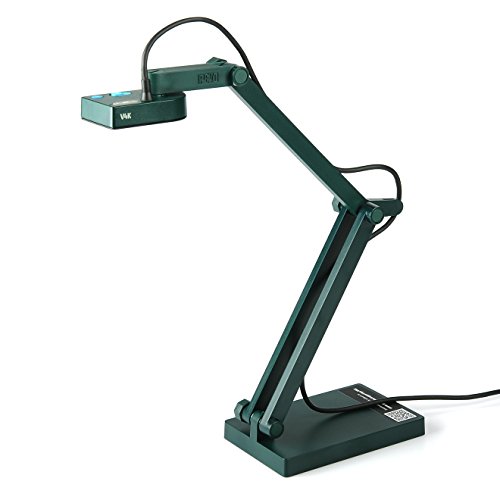
- 8MP Sony CMOS sensor captures high-resolution images
- Streams up to 30 fps at Full HD
- Works with Mac, Windows, and Chromebook
Best For: Teachers needing a versatile camera for live lessons and remote teaching
Best for Large Materials
INSWAN INS-2 4K A3 Document Camera

- 13MP Sony sensor records 4K video
- Flexible arm captures documents up to A3 size
- Includes LED lighting and Documate teaching software
Best For: Art instructors and educators presenting oversized materials
Best Compact Option
Kitchbai KB-700 4K USB Visualiser

- Foldable design with multi-angle positioning
- 8MP capture reaches 2448P at up to 30 fps
- Includes adjustable lighting and dual microphones
Best For: Teachers needing a portable USB camera for demonstrations
Best Connectivity
ELMO TT-12G 4K Interactive Document Camera
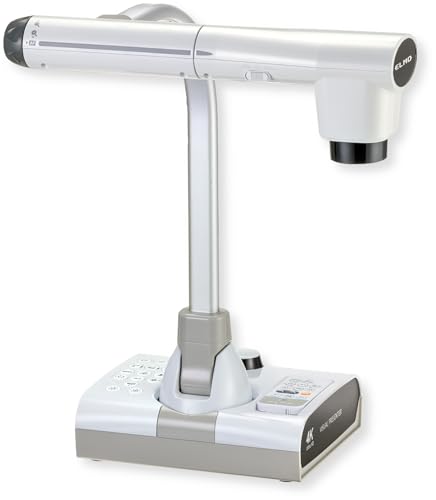
- Offers HDMI, USB, and VGA outputs
- 12MP 4K imaging with 192x total zoom
- Includes LED lighting and SD card recording
Best For: Classrooms connecting to modern and legacy display equipment
Best 4K Classroom Flexibility
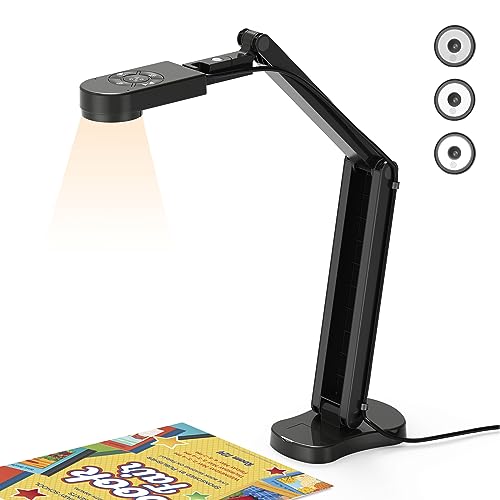
- 2448p output at 30fps
- Foldable A3 capture design
- Three-level lights and dual microphones
Best For: High-resolution demonstrations across Windows, macOS, and Chrome OS
Best Established Presenter Design
Elmo OX-1 1080p Document Camera

- 1080p Full HD capture
- One-push autofocus
- A3 area and 8x digital zoom
Best For: USB classroom presentation with a built-in microphone
Best Button-Controlled Value
PAKOTOO 8MP Classroom Document Camera

- 2448p 8MP capture
- Physical brightness and exposure controls
- Foldable A3 design with LED light
Best For: Portable USB teaching with direct onboard image controls
High-Resolution Pick
INS-1 Classic USB Document Camera

- 8MP Sony camera with 30fps streaming
- Autofocus, macro mode, LED, and anti-glare sheet
- Includes annotation and recording software
Best For: High-detail classroom demonstrations and live annotation
Flexible A3 Pick
PAKOTOO 5MP USB Document Camera

- Supports documents up to A3 size
- Three-level LED and adjustable exposure
- Foldable, multi-angle 3-in-1 design
Best For: Wide worksheets, demonstrations, and remote lessons
Portable Audio Pick

- Foldable 360-degree camera design
- 1080p video at 30fps with manual focus
- Dual built-in microphones and USB-C
Best For: Portable hybrid teaching and interactive video lessons
Best Overall – IPEVO V4K 8MP Ultra HD Document Camera
The IPEVO V4K is a practical document camera for classroom demonstrations, remote teaching, and video conferencing. Its 8MP Sony CMOS sensor captures high-resolution images, while fast autofocus and up to 30 fps at Full HD help keep live lessons responsive.
Best For: Teachers who want sharp live demonstrations across Mac, Windows, and Chromebook devices.
Pros:
- 8MP resolution supports images up to 3264 x 2448 pixels.
- Up to 30 fps at Full HD enables smooth live streaming.
- Fast autofocus and Sony sensor help with frequent material changes and dimmer environments.
- Multi-jointed stand and broad software compatibility add classroom flexibility.
Cons:
- No optical or digital zoom is listed.
- USB connectivity requires a compatible computer or Chromebook.
- Some listed system requirements may be demanding for older computers.
The V4K is a strong all-around choice when image quality, smooth streaming, and cross-platform compatibility matter more than built-in lighting or standalone outputs.
Best for Large Materials – INSWAN INS-2 4K A3 Document Camera
The INSWAN INS-2 is a document camera for classroom use when you need to show large documents, artwork, or two-page spreads. Its 13MP Sony sensor records 4K video at 30 fps, and the flexible arm accommodates materials up to A3 size.
Best For: Professional educators and art instructors presenting large-format work in classrooms or exhibitions.
Pros:
- 13MP sensor delivers 4K video at 3840 x 2160 and 30 fps.
- A3 capture area suits large documents, artwork, and two-page spreads.
- Built-in LED, anti-glare sheet, brightness control, and dual autofocus support polished presentations.
- Documate software includes annotation, recording, scanning, whiteboard tools, and OCR.
Cons:
- Its 2.3-pound body is heavier than compact classroom models.
- Compatibility details include specific minimum operating-system versions.
- The listed continuous shooting specification is inconsistent with the stated 4K/30 fps feature.
With large-format coverage and presentation-focused software, the INS-2 is especially compelling for teachers who regularly display artwork or oversized teaching materials.
Best Compact Option – Kitchbai KB-700 4K USB Visualiser
The Kitchbai KB-700 is a foldable document camera for classroom demonstrations, online meetings, and distance education. It combines an 8MP sensor, A3 coverage, adjustable lighting, manual image reversal, and dual microphones in a portable USB design.
Best For: Teachers who need a space-saving camera with flexible positioning and built-in audio.
Pros:
- 8MP capture supports up to 2448P output and 30 fps.
- Foldable, multi-joint design is convenient to carry and position.
- Three brightness levels help handle dark or bright shooting conditions.
- Dual built-in microphones are designed to reduce noise and improve sound quality.
Cons:
- It uses USB connectivity rather than listed HDMI or VGA outputs.
- The supplied specifications describe 2448P rather than 4K video output.
- Manual focus behavior may require an extra press when changing subjects.
The KB-700 is a sensible pick for mobile or space-conscious classrooms, particularly when adjustable lighting and integrated microphones are more useful than advanced output options.
Best Connectivity – ELMO TT-12G 4K Interactive Document Camera
The ELMO TT-12G is a document camera for classroom presentations that need flexible connections and detailed zoom. It offers 4K imaging, a 12MP sensor, HDMI, USB, and VGA outputs, plus a multi-angle arm and wide 18.5-by-10.2-inch capture area.
Best For: Classrooms using a mix of modern and legacy displays, projectors, or presentation systems.
Pros:
- 4K Ultra HD imaging and a 12MP sensor produce detailed presentations.
- HDMI, USB, and VGA outputs support modern and older equipment.
- 12x optical and 16x digital zoom provide 192x total zoom.
- Built-in LED lighting, one-touch autofocus, recording to SD card, and Miracast compatibility add flexibility.
Cons:
- At 6.6 pounds, it is substantially heavier than compact USB models.
- Its larger footprint may be less convenient for small desks.
- Miracast wireless sharing depends on compatible displays.
The TT-12G is the most connection-friendly option in this group and makes the most sense for established classrooms that need broad display compatibility, strong zoom, and presentation controls.
Best 4K Classroom Flexibility – THUSTAR 8MP Document Camera
The THUSTAR is a versatile document camera for classroom demonstrations, remote lessons, and video meetings. Its 8MP sensor supports up to 2448p output at 30fps, while the foldable, multi-joint design covers documents and objects up to A3 size.
Best For: Teachers who want high-resolution live demonstrations with flexible positioning, built-in lighting, and broad computer compatibility.
Pros:
- Captures up to 2448p video at 30fps with an 8MP sensor.
- Manual image inversion, brightness controls, and one-push autofocus make classroom setup more adaptable.
- Foldable A3-capable design includes three-level LED lighting and dual noise-reducing microphones.
- Works with Windows, macOS, and Chrome OS, plus platforms including Zoom, Teams, Meet, and OBS.
Cons:
- Uses USB connectivity rather than a standalone HDMI output.
- The product listing contains inconsistent dimensional information, so verify the working-area specifications before purchase.
Choose this model if image detail, adjustable illumination, and flexible capture angles matter more than the simplest possible setup. Its software and operating-system compatibility make it a strong all-around option for connected classrooms.
Best Established Presenter Design – Elmo OX-1 1080p Document Camera
The Elmo OX-1 is a straightforward document camera for classroom presentation and USB-based teaching. It captures 1080p video at up to 15fps or 720p at up to 30fps, with one-push autofocus, an A3 capture area, and a foldable body.
Best For: Classrooms that prioritize a purpose-built visual presenter with reliable autofocus, a built-in microphone, and a simple USB workflow.
Pros:
- Provides 1080p Full HD capture at up to 15fps and 720p at up to 30fps.
- One-push autofocus supports subjects from 100mm to infinity.
- Offers an A3 capture area, 8x software-based digital zoom, and a built-in microphone.
- Folds from its setup dimensions for easier storage.
Cons:
- Its maximum listed video resolution and frame rate are lower than the 4K-class alternatives.
- The 8x zoom is digital rather than optical.
- Connectivity is limited to USB in the supplied specifications.
The OX-1 is a practical choice when you want a focused visual presenter rather than a feature-heavy webcam. It offers useful classroom basics, though buyers seeking the highest-resolution output may prefer a newer 4K-capable model.
Best Button-Controlled Value – PAKOTOO 8MP Classroom Document Camera
The PAKOTOO is a compact document camera for classroom and distance-learning use, offering 2448p capture, autofocus, image inversion, and A3 coverage. Its foldable multi-joint stand and onboard controls are useful for showing both flat pages and three-dimensional objects.
Best For: Teachers who need a portable USB camera with physical brightness, exposure, focus, and image-reversal controls.
Pros:
- Uses an 8MP sensor with 2448p high-definition output.
- Physical controls provide three brightness levels, ten exposure levels, and image reversal.
- Foldable design covers documents up to A3 size and supports multi-angle positioning.
- Includes autofocus, three-level LED lighting, dual microphones, and a USB-C cable.
Cons:
- Does not support zoom or HDMI features.
- Is not fully plug and play; users must select “USB Camera” in the computer’s system settings.
- Does not support iPad according to the supplied notes.
PAKOTOO makes sense for classrooms that value hands-on controls and portability. The setup is flexible and detailed, but its lack of HDMI, zoom, and automatic device recognition should be considered before buying.
High-Resolution Pick – INS-1 Classic USB Document Camera
The INS-1 is a strong document camera for classroom instruction when clear detail, smooth streaming, and flexible software tools matter. Its 8MP Sony camera supports up to 3264 x 2448 resolution and 30fps video, while autofocus, LED lighting, and an included anti-glare sheet help with varied teaching setups.
Best For: Teachers who want high-resolution demonstrations, annotation tools, and broad computer compatibility.
Pros:
- 8MP imaging with 30fps streaming across resolutions
- Autofocus and macro capture for objects as close as 3.9 inches
- INSWAN Documate software supports annotation, recording, snapshots, rotation, and digital zoom
- Compatible with Windows, Mac, iPad, and Chromebook devices
Cons:
- Uses a USB-A cable, so some newer devices may need an adapter
- Its software compatibility varies by operating-system version
The INS-1 stands out for classrooms that regularly show fine print, manipulatives, or close-up projects. Its multi-joint, space-saving design and lighting controls add practical flexibility, though teachers using USB-C-only hardware should plan for connectivity.
Flexible A3 Pick – PAKOTOO 5MP USB Document Camera
The PAKOTOO is a flexible document camera for classroom use, combining a document scanner, webcam, and presentation camera in one foldable design. Its A3 capture area, adjustable hose structure, fill light, and 1080p streaming make it suited to worksheets, demonstrations, and remote lessons.
Best For: Teachers who need wide-format A3 coverage and adjustable positioning for hybrid or remote teaching.
Pros:
- Captures documents up to A3 size
- Flexible structure and lens orientation support multiple viewing angles
- Three-level LED fill light and five-level exposure adjustment help in uneven lighting
- Autofocus, image inversion, and 1080p video at up to 30fps
Cons:
- Not fully plug and play; users need to select “USB Camera” in the computer system
- Uses a 5MP sensor rather than the higher resolution offered by some alternatives
- No HDMI output is listed
The PAKOTOO is a practical choice when large pages and flexible framing are priorities. Its USB-C cable suits compatible newer devices, but the initial camera-selection step may require a little setup before class.
Portable Audio Pick – Gawervan 1080P USB Doc Camera
The Gawervan is a compact document camera for classroom and remote teaching setups that also works as a webcam and visualizer. It provides 1080p video at 30fps, a rotating lens, manual focus, dual built-in microphones, and USB-C connectivity for lessons, meetings, and demonstrations.
Best For: Teachers who value portability, flexible camera angles, and built-in audio for interactive online instruction.
Pros:
- Foldable design with a 360-degree adjustable lens for travel and varied viewpoints
- 1080p video at 30fps for worksheets, objects, and demonstrations
- Dual built-in microphones are designed for noise-reduced collaboration
- Works with Windows, Mac, Chromebook, Teams, Skype, and other listed applications
Cons:
- Manual focus requires the user to adjust sharpness
- Unlike some listed models, no built-in LED light is specified
- The supplied notes do not specify a document-size capture limit
The Gawervan makes sense for instructors who move between classrooms or teach from home and want camera and microphone functions in one compact unit. Its manual focus offers control, but it may take more attention than an autofocus model during quick demonstrations.
How We Picked the Best Document Camera for Classroom Use
We focused on features that affect everyday teaching rather than headline specifications alone. Resolution matters for small print and detailed demonstrations, while autofocus and image controls help teachers move between pages, objects, and writing surfaces quickly. We also considered whether each camera supports common platforms and devices, including Windows PCs, Macs, Chromebooks, USB displays, and classroom conferencing software.
Because classroom setups vary, the selection includes compact USB models, A3-capable visualisers, and higher-end presenters with HDMI, VGA, or more advanced controls. Built-in microphones, LED lighting, foldable arms, and flexible positioning were also considered for hybrid lessons and limited desk space.
Quick Comparison
| Feature | What to look for | Why it matters |
|---|---|---|
| Resolution | 1080p to 4K | Sharper text, diagrams, and objects |
| Sensor | 8MP to 13MP | More detail and cropping flexibility |
| Capture area | A4 or A3 | Determines how much of a page or project fits in frame |
| Connection | USB, HDMI, VGA | Controls compatibility with computers and displays |
| Lighting | Built-in LED or adjustable light | Reduces shadows in dim classrooms |
Key Buying Factors for a Document Camera for Classroom Teaching
Image Quality and Autofocus
Choose at least 1080p for readable classroom content. A 4K model can reveal finer detail, but good autofocus and exposure control may be more useful than maximum resolution when lessons move quickly.
Size and Positioning
An A3 capture area is helpful for maps, posters, art projects, and larger textbooks. Look for a flexible or foldable arm if the camera must share a crowded teacher desk.
Connectivity and Software
USB models are usually the simplest choice for computers and video-conferencing apps. If you connect directly to a projector or interactive display, HDMI or VGA output may be more convenient. Confirm operating-system and software compatibility before buying.
Lighting, Microphones, and Controls
Built-in LEDs help with shadowed pages, while image inversion and one-touch autofocus can save time. A built-in microphone is useful for remote instruction, though a dedicated headset or room microphone may provide better audio in larger spaces.
Who Should Buy Which Document Camera for Classroom?
For everyday USB teaching: Choose a compact 8MP model with autofocus, broad compatibility, and a straightforward plug-and-play setup.
For detailed demonstrations: A 4K camera with a larger sensor and A3 capture area is better for science specimens, artwork, maps, and small text.
For hybrid or remote lessons: Prioritize a built-in microphone, stable positioning, adjustable lighting, and dependable webcam support.
For projector-based classrooms: Select a presenter with direct HDMI or VGA output if you do not want to route every lesson through a computer.
For shared classrooms: A foldable arm, durable controls, and compatibility with Mac, Windows, and Chromebook devices make the camera easier for multiple teachers to use.