The best field monitors with touchscreens make on-camera monitoring easier when your camera’s built-in display is too small, dim, or limited for serious video work. A larger screen can improve framing, expose focus issues, and provide useful tools such as waveform, false color, peaking, and 3D LUT previews.
This roundup compares 10 touchscreen monitors across compact DSLR setups, mirrorless rigs, bright outdoor productions, and larger cinema-style builds. Pay close attention to brightness, screen size, HDMI support, power options, and the monitoring tools you actually use.
Best 10 Field Monitors with Touchscreens Picks for 2026
Bright Outdoor Pick
NEEWER F700 7" Touchscreen Monitor

- 2000-nit IPS touchscreen with automatic backlight control
- 4K HDMI loop-through and extensive monitoring tools
- Supports custom 3D LUT uploads and multiple power options
Best For: Outdoor filming and creators who prefer a larger, highly visible display
Lightweight Value Pick
Portkeys PT5 II 5" Touchscreen Monitor

- Compact 5-inch Full HD touchscreen with 178° viewing angle
- 4K30P input/output and comprehensive video-assist tools
- Lightweight design supports portable camera rigs
Best For: Run-and-gun, gimbal, and travel setups where low weight is important
Advanced Control Pick
VILTROX DC550 Pro II 5.5" Monitor

- 1400-nit multi-touch screen with knob-based operation
- 4K/60 HDMI 2.0 input and loop output
- Camera control, custom LUTs, and extensive included accessories
Best For: Creators wanting advanced monitoring and direct camera-control features
Outdoor Focus Pick
FEELWORLD F5 Prox 5.5" Monitor

- 1600-nit display for brighter outdoor monitoring
- Focus peaking, waveform, histogram, false color, and LUT preview
- Mounts to cameras, cages, gimbals, tripods, and handheld rigs
Best For: Location shooters prioritizing focus and exposure visibility
Best for Easy Setup

- 2800-nit 1920x1080 IPS touchscreen
- 4K HDMI input and 30Hz pass-through
- Professional scopes, LUTs, and flexible power
Best For: Outdoor filmmakers needing high brightness and detailed monitoring
Large-Screen Pro Choice
FEELWORLD LUT11H 10.1-Inch Monitor

- 10.1-inch 1920x1200 touchscreen
- 2000-nit brightness and 4K 60Hz HDMI
- Scopes, custom buttons, tally, and accessory power
Best For: Collaborative productions needing a large bright monitoring surface
Lightweight Starter Pick

- 300-gram 7-inch touchscreen monitor
- Histogram, zebras, focus assist, and false color
- Includes two F550 batteries and multiple cables
Best For: Beginners and mobile creators building a lightweight camera rig
Best Bright 5.5-Inch Pick

- 1200-nit Full HD IPS touchscreen
- 4K HDMI input and output
- Waveform, false color, HDR, and 3D LUT tools
Best For: Compact daylight monitoring with flexible power options
Best Ultra-Bright 7-Inch Pick

- 2800-nit 7-inch touchscreen
- 4K 60Hz HDMI 2.0 pass-through
- Shortcut buttons and professional scopes
Best For: Outdoor filmmaking in challenging daylight
Best Built-In Battery Pick
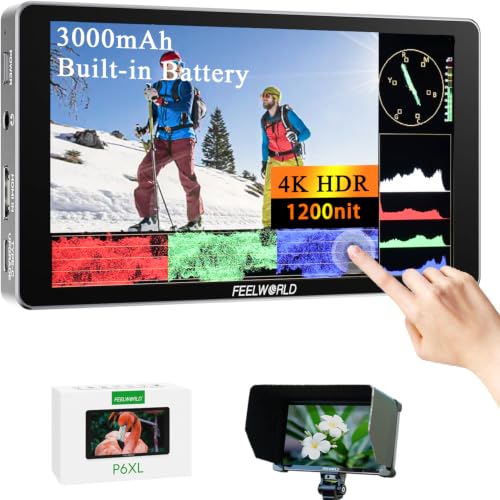
- 6-inch 1200-nit touchscreen
- Built-in rechargeable battery
- HDR, waveform, LUT, and image overlay tools
Best For: Portable shooting without a separate monitor battery
Bright Outdoor Pick – NEEWER F700 7" Touchscreen Monitor
The NEEWER F700 is a strong choice among field monitors with touchscreens when outdoor visibility is a priority. Its 7-inch 2000-nit IPS display, automatic backlight control, 4K HDMI loop-through, and broad monitoring toolset make it practical for bright-location filming and more demanding setups.
Best For: Outdoor videographers who want a large, highly visible screen with professional exposure, focus, and color tools.
Pros:
- 2000-nit display with ambient-light-based automatic brightness adjustment
- 4K HDMI input and loop output with headphone monitoring
- Includes waveform, vectorscope, false color, zebras, histogram, HDR, and focus tools
- Supports 15 preloaded and up to 60 custom 3D LUTs
Cons:
- Battery, DC cable, and SD card are not included
- At 1.6 pounds, it is heavier than compact 5-inch options
- Cooling fans may add operational noise in some environments
The F700 stands out for sunlight readability and flexible monitoring. Its size and cooling system favor tripod, rig, or studio use more than ultra-light handheld work.
Lightweight Value Pick – Portkeys PT5 II 5" Touchscreen Monitor
The Portkeys PT5 II is a compact option for shoppers comparing field monitors with touchscreens for lightweight camera rigs. Its 5-inch Full HD screen, 4K30P input/output, wide viewing angle, and detailed waveform and LUT features provide useful video-assist functions without a larger monitor footprint.
Best For: Run-and-gun shooters and gimbal users who need a lightweight monitor with core exposure and focus aids.
Pros:
- Light and slim design with a 5-inch 1920×1080 display
- Supports 4K30P input and output
- Includes Luma and RGB waveforms, histogram, false color, zebras, and peaking
- Compatible with NP-F-series or Canon LP-E6 batteries
Cons:
- Battery is not included
- Smaller screen than 5.5-inch and 7-inch alternatives
- The supplied details do not specify a high-brightness rating for direct-sunlight use
The PT5 II prioritizes portability while retaining a useful set of professional monitoring functions. It is a sensible fit when weight and rig balance matter more than maximum outdoor brightness.
Advanced Control Pick – VILTROX DC550 Pro II 5.5" Monitor
The VILTROX DC550 Pro II is one of the more feature-rich field monitors with touchscreens in this group. It combines a 1400-nit multi-touch display and HDMI 2.0 4K/60 transmission with customizable scopes, camera control over Wi-Fi and USB-C, and a substantial accessory kit.
Best For: Hybrid shooters and creators who want monitor-based camera control, advanced composition aids, and included field accessories.
Pros:
- 1400-nit 5.5-inch touchscreen with physical control knob
- HDMI 2.0 supports 4K at 60Hz input and loop output
- Customizable waveform, histogram, vectorscope, frame guides, and onion-skin overlay
- Includes an NP-F battery, sun hood, mini ball, cables, case, and hex wrench
Cons:
- Camera-control compatibility is specified for Sony, Canon, Nikon, and Fujifilm models, so users should verify their camera
- More features may mean a steeper learning curve than simpler monitors
- The supplied details do not provide total product weight
The DC550 Pro II offers the broadest control-oriented feature set here. Its 4K/60 support and included accessories make it especially appealing for creators building a capable on-location monitoring package.
Outdoor Focus Pick – FEELWORLD F5 Prox 5.5" Monitor
The FEELWORLD F5 Prox is a straightforward option among field monitors with touchscreens for checking focus, exposure, and framing away from the camera’s built-in display. Its 1600-nit screen and core professional tools are well suited to outdoor filming, while standard mounting points support rigs, gimbals, tripods, and handheld configurations.
Best For: Photographers, videographers, vloggers, and filmmakers who need a brighter external screen for location work.
Pros:
- 1600-nit display designed for clearer direct-sunlight monitoring
- Includes focus peaking, waveform, histogram, false color, and LUT preview
- Works with DSLR, mirrorless, and cinema cameras
- Mounts to rigs, cages, gimbals, tripods, and handheld setups
Cons:
- The supplied details do not specify resolution, viewing angle, or connection details
- Listed battery information indicates one lithium-ion battery is required and included, but no broader power options are provided
- At 2.82 pounds in the package details, it may be less attractive for weight-sensitive rigs
The F5 Prox focuses on the essentials: a bright display and practical exposure and focus aids. It is a good match for creators who want a location-friendly monitor without relying on an extensive feature list.
Best for Easy Setup – VILTROX DC-A1 7-Inch Monitor
For shooters comparing field monitors with touchscreens, the VILTROX DC-A1 stands out with a 7-inch 1920×1080 IPS display and 2800-nit brightness. Its HDMI pass-through, monitoring tools, and flexible power options make it a practical choice for outdoor and extended shooting sessions.
Best For: Outdoor filmmakers and camera operators who need a bright, full-HD touchscreen with professional exposure tools.
Pros:
- Very bright 2800-nit screen with a 170-degree viewing angle.
- Supports 4K HDMI input and pass-through up to 30Hz.
- Includes waveform, vectorscope, false color, zebras, HDR, and focus peaking.
- Offers NP-F, USB-C, and DC power options, with an NP-F550 battery included.
Cons:
- 4K pass-through is limited to 30Hz.
- The 7-inch screen is smaller than the 10.1-inch alternative in this roundup.
- DC power cable is not included.
The DC-A1 is a strong all-around option when daylight visibility and detailed monitoring matter most. Custom 3D LUT support, shortcut buttons, cooling, and multiple mounting points add useful flexibility for more demanding rigs.
Large-Screen Pro Choice – FEELWORLD LUT11H 10.1-Inch Monitor
The FEELWORLD LUT11H is one of the more spacious field monitors with touchscreens, pairing a 10.1-inch 1920×1200 display with 2000-nit brightness. Its large viewing area, 4K 60Hz HDMI support, and crew-friendly features suit productions where visibility and fast control are priorities.
Best For: Collaborative shoots, studio production, and operators who prefer a large bright display with advanced monitoring functions.
Pros:
- Large 10.1-inch 1920×1200 IPS display with a 170-degree viewing angle.
- Supports 4K HDMI input and output at up to 60Hz.
- Touchscreen, scroll-wheel control, custom buttons, and professional scopes are included.
- Dual battery slots and an F970 accessory power design support extended setups.
Cons:
- The display is less bright than the VILTROX DC-A1.
- F970 battery is not included.
- Its larger size may be less convenient for compact handheld rigs.
Choose the LUT11H when screen size, smooth 4K 60Hz handling, and team visibility outweigh portability. The tally indicator, auxiliary 8V output, and external accessory mounting make it especially useful in organized production environments.
Lightweight Starter Pick – FEELWORLD FW759 Pro
For creators seeking affordable, lightweight field monitors with touchscreens, the FEELWORLD FW759 Pro offers a 7-inch 1280×800 IPS display in a 300-gram body. It is designed to provide a clearer framing and focus reference than a camera’s built-in screen while remaining easy to add to handheld or gimbal rigs.
Best For: Beginners, vloggers, interview creators, and mobile shooters who want a simple touchscreen monitor with useful exposure aids.
Pros:
- Lightweight 300-gram design works well on handheld and gimbal setups.
- 7-inch IPS screen is larger than a typical built-in camera display.
- Includes histogram, zebra, focus assist, and false color tools.
- Comes with two F550 batteries, a sunshade, and multiple HDMI cables.
Cons:
- 1280×800 resolution is lower than the other monitors here.
- 400-nit brightness is less suited to strong direct sunlight.
- Details do not specify 4K HDMI support.
The FW759 Pro prioritizes portability and a ready-to-shoot package over maximum brightness or resolution. It is a sensible entry-level choice for checking framing, focus, and exposure without adding much weight to a camera rig.
Best Bright 5.5-Inch Pick – VILTROX DC-550 Pro II
If you need field monitors with touchscreens for daylight shooting, the VILTROX DC-550 Pro II combines a 1200-nit display with Full HD resolution, 4K HDMI pass-through, and practical exposure and focus tools. Its compact 5.5-inch size suits DSLR, mirrorless, camcorder, and cinema-camera setups.
Best For: Filmmakers and photographers who want a bright, compact touchscreen monitor with broad monitoring tools and flexible power options.
Pros:
- 1200-nit IPS display with anti-glare finish and wide viewing angles.
- Supports 4K HDMI input and output, plus headphone monitoring.
- Includes waveform, vectorscope, histogram, false color, focus assist, HDR, and custom 3D LUT support.
- Runs from an included NP-F550 battery, DC input, or USB-C power bank.
Cons:
- The 5.5-inch screen is smaller than the displays on the other options here.
- Its native resolution is Full HD rather than 4K.
The DC-550 is a well-rounded choice when portability matters but you still need professional exposure, color, and focus assistance. The included battery, hood, cables, and case also make it ready for field use.
Best Ultra-Bright 7-Inch Pick – VILTROX DC-A1
Among field monitors with touchscreens, the VILTROX DC-A1 stands out for outdoor visibility. Its 2800-nit, 7-inch display is designed for bright conditions, while 4K 60Hz HDMI 2.0 pass-through and dedicated monitoring controls support demanding video workflows.
Best For: Directors, documentary crews, and videographers who prioritize maximum daylight visibility and a larger on-camera display.
Pros:
- 2800-nit 7-inch IPS touchscreen is suited to direct-sunlight monitoring.
- Supports 4K 60Hz HDMI 2.0 input and output with pass-through.
- Includes waveform, vectorscope, histogram, false color, focus peaking, and custom 3D LUT support.
- Offers touchscreen control, shortcut buttons, and NP-F, DC, or USB-C power.
Cons:
- The larger 7-inch design may be less compact for lightweight camera rigs.
- The listed native display resolution is 1920×1080.
The DC-A1 is the strongest fit when visibility and screen size take priority. Its high brightness, 4K 60Hz signal support, physical shortcut buttons, and included hard-shell case make it particularly practical for professional outdoor production.
Best Built-In Battery Pick – FEELWORLD P6XL
The FEELWORLD P6XL is a practical option for field monitors with touchscreens when portability and self-contained power are important. Its 6-inch, 1200-nit display provides Full HD monitoring, while the built-in rechargeable battery avoids the need to carry a separate NP-F battery.
Best For: Mobile shooters who want a lightweight touchscreen monitor with built-in power, HDR tools, waveform displays, and 3D LUT support.
Pros:
- Compact 332-gram design with a 6-inch, 1200-nit touchscreen.
- Built-in 22.2Wh rechargeable battery provides about two hours at full brightness.
- Offers HDR, waveform, vectorscope, histogram, audio displays, and custom 3D LUT loading.
- Supports screenshots and image overlays for composition comparison.
Cons:
- Its single HDMI connection is less flexible than monitors with HDMI input and output.
- Battery runtime is limited to about two hours at 100% brightness.
- The display is Full HD and has a glossy finish.
The P6XL makes sense for handheld, travel, and mobile setups where reducing external accessories matters. Its built-in battery and compact body are useful advantages, while the extensive waveform, HDR, LUT, and overlay features add value for more controlled shooting.
How We Picked These Field Monitors with Touchscreens
We selected models based on the features that most directly affect real-world camera monitoring: touchscreen responsiveness, display brightness, resolution, HDMI compatibility, supported frame rates, focus and exposure tools, LUT support, mounting flexibility, and power design. The list includes compact 5- to 5.5-inch monitors, versatile 7-inch options, and larger 10.1-inch screens for crews that prioritize visibility over portability.
Brightness claims are especially important for outdoor work, but they should not be viewed in isolation. A high-nit screen is more useful when paired with a sun hood, a practical battery solution, and controls that remain easy to access on a rig.
Quick Comparison
- Best for portability: Compact 5- and 5.5-inch monitors are easier to mount on small mirrorless or DSLR rigs.
- Best for outdoor visibility: Look for models rated around 1,200 nits or higher, preferably with a sunshade.
- Best for larger crews: Seven-inch and 10.1-inch displays make framing easier for operators, assistants, and directors.
- Best for high-frame-rate workflows: Confirm that the monitor supports the exact 4K resolution and 60Hz signal your camera outputs.
- Best for exposure and focus: Prioritize waveform, false color, zebras, vectorscope, peaking, magnification, and 3D LUT tools.
Key Buying Factors for Field Monitors with Touchscreens
Brightness and Screen Size
For frequent daylight shooting, a 1,200-nit or brighter display is usually a more practical starting point than a basic 400-nit panel. Larger screens improve visibility and collaboration but add weight and draw more power. Choose the smallest display that still lets you judge focus and composition confidently.
Inputs, Outputs, and Signal Support
Check whether your camera uses full-size HDMI, mini HDMI, or micro HDMI, and budget for a secure, compatible cable. If you need to send the image to another monitor, recorder, or wireless transmitter, verify that the monitor includes HDMI output. Also confirm support for your camera’s 4K frame rate; “4K compatible” does not always mean 4K at 60 frames per second.
Touch Controls and Monitoring Tools
Touch operation can speed up menu access and tool selection, but physical buttons remain useful when the monitor is mounted out of reach. For video production, prioritize focus peaking, image magnification, false color, waveform, zebras, histogram, and LUT preview rather than choosing based on touchscreen capability alone.
Power, Mounting, and Rigging
Review battery compatibility, included batteries, USB power options, runtime expectations, and whether the mounting points suit your cage or articulating arm. A monitor that is excellent on paper can be frustrating if it drains batteries quickly or cannot be positioned securely.
Who Should Buy Which Field Monitors with Touchscreens?
Choose a compact 5- or 5.5-inch model if you travel light, use a gimbal, or want better focus control without making your camera rig bulky. Choose a 7-inch monitor if you shoot interviews, events, narrative work, or solo productions where a clearer viewing distance matters. Choose a 10.1-inch model when multiple people need to see the image or when the monitor will remain on a tripod, shoulder rig, or studio setup.
For bright exterior work, favor the highest practical brightness and include a hood. For controlled interiors, resolution, color tools, accurate exposure aids, and convenient power may matter more than maximum nit output. Before buying, match the monitor’s connectors and signal limits to your camera, then confirm that its weight and battery system fit your complete rig.