The best document cameras with optical zoom make it easier to show fine print, diagrams, lab work, books, and physical objects without constantly repositioning the camera. Optical zoom preserves detail by magnifying the image through the lens rather than simply enlarging pixels.
Our selection includes classroom visual presenters, portable USB models, and flexible webcam-style cameras. The right choice depends on your display connections, resolution needs, working distance, software compatibility, and whether you need a built-in light or microphone.
Best 10 Document Cameras with Optical Zoom Picks for 2026
Best Classroom Value

- 10x optical zoom and 1080p video
- HDMI display output without a computer
- A3 capture area with flexible gooseneck
Best For: Teachers needing versatile classroom presentation features
Portable FlexArm Pick
AVerVision F17-8M Document Camera

- Portable FlexArm design
- Designed for HD teaching and presentation
- Weighs 7.45 pounds
Best For: Classrooms needing a repositionable presentation camera
Most Connected

- 12x optical zoom and 3.4MP sensor
- HDMI, Wi-Fi, Miracast, USB, and Ethernet
- Android platform with autofocus options
Best For: STEM classrooms needing broad wired and wireless connectivity
Best for Microscope Demonstrations

- 12x optical zoom with 1080p output
- Included microscope adapter
- Autofocus, microphone, software, and carrying case
Best For: Science lessons and detailed microscope presentations
Professional Zoom Pick
Elmo TT-12ID Interactive Document Camera

- 96x total optical and digital zoom
- 3.4MP sensor with 1080p capture
- HDMI input and adjustable camera arm
Best For: Detailed demonstrations and presentations
High-Resolution USB Pick
IPEVO V4K 8MP USB Document Camera
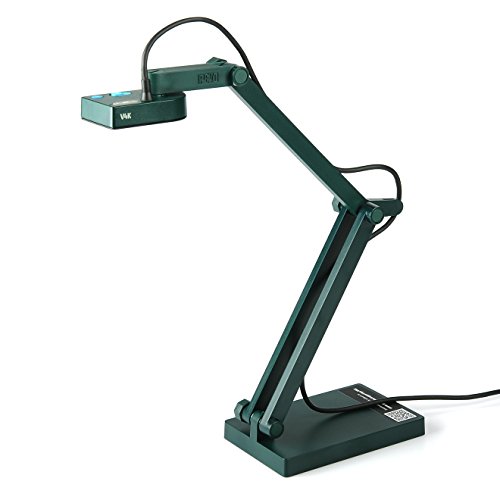
- 8MP image capture up to 3264 x 2448
- Autofocus and up to 30 fps full HD streaming
- Works with Mac, Windows, and Chromebook
Best For: Remote teaching and USB-connected presentations
Balanced HDMI Pick
Elmo TT-12 3.4MP Document Camera

- 12x optical zoom
- 3.4MP CMOS sensor with 1080p video
- HDMI output and autofocus
Best For: HDMI-equipped classrooms and meeting rooms
Best with Extra Features

- 8MP capture with 30-fps video
- Autofocus, macro mode, LED, and anti-glare sheet
- USB compatibility across PC, Mac, iPad, and Chromebook
Best For: Distance learning and desktop demonstrations
Portable Classroom Option

- 1080p output with listed 8x zoom
- One-touch autofocus and freeze button
- USB setup, built-in microphone, and carrying case
Best For: Classroom lessons and portable presentations
Professional Detail Specialist

- 15x zoom glass lens with 8MP Sony sensor
- Handheld capture, autofocus, ring light, and noise-canceling mic
- EnSpire tools for meetings, notes, measurement, and demonstrations
Best For: Detailed inspection, crafting, and professional live demos
Best Classroom Value – INEBIZ IB280 10x Optical Zoom
For shoppers comparing document cameras with optical zoom, the INEBIZ IB280 combines 10x optical zoom with autofocus, HDMI output, and a flexible A3-capable design. It can display directly on a monitor, projector, or interactive whiteboard without requiring a computer.
Best For: Teachers who need flexible classroom presentation, document capture, and 3D-object viewing.
Pros:
- 10x optical zoom plus 30x digital zoom
- 1080p video with autofocus and manual focus options
- HDMI, USB, SD card, microphone, and LED lighting
- Supports freeze, split-screen comparison, and annotation software
Cons:
- 2MP still-image resolution is modest compared with some higher-resolution models
- At 2 kg, it is not the lightest portable option
The IB280 is a well-equipped choice when direct HDMI presentation, flexible positioning, and classroom-focused controls matter more than maximum still-image resolution.
Portable FlexArm Pick – AVerVision F17-8M Document Camera
The AVerMedia AVerVision F17-8M is a portable FlexArm document camera designed for presenting and teaching in HD. Its articulated form factor makes it a practical option for classrooms where the camera needs to be repositioned between lessons.
Best For: Educators prioritizing a portable, flexible document-camera setup for dynamic lessons.
Pros:
- Portable FlexArm design
- Designed for high-definition presentation
- Well suited to dynamic classroom lessons
Cons:
- The supplied notes do not specify optical-zoom magnification
- At 7.45 pounds, it may be less convenient to move frequently than lighter models
This model is worth considering for its FlexArm portability and teaching focus, but buyers specifically seeking a documented optical-zoom range should verify the current specifications before purchasing.
Most Connected – ELMO TT-12W STEM-CAM
The ELMO TT-12W stands out among document cameras with optical zoom for its 12x optical zoom, 3.4MP sensor, and broad connectivity. HDMI, RGB, USB, Ethernet, Wi-Fi, and Miracast support give it flexibility for both wired and wireless classroom setups.
Best For: STEM classrooms and educators who want extensive connectivity, wireless display options, and built-in Android support.
Pros:
- 12x optical zoom with 16x digital zoom
- 3.4MP sensor, 1080p output, and 30 fps capture
- HDMI input and output, RGB, USB, Ethernet, Wi-Fi, and Miracast
- Autofocus options, Android support, and a built-in remote dock
Cons:
- Its 11-pound listed weight makes it less portable
- More features and connections may be unnecessary for simple document display
The TT-12W is the strongest fit for feature-heavy teaching environments. Its optical zoom, wireless capabilities, and Android platform provide room to expand beyond basic paper and book demonstrations.
Best for Microscope Demonstrations – Epson DC-21 Document Camera
The Epson DC-21 is a high-definition document camera with 12x optical zoom, 10x digital zoom, and 1080p output. Its included microscope adapter makes it especially useful for science demonstrations, while HDMI connectivity supports direct high-definition presentation.
Best For: Science teachers and presenters who need optical zoom plus microscope-based demonstrations.
Pros:
- 12x optical zoom and 10x digital zoom
- 1080p video with autofocus
- Includes a microscope adapter, remote control, and carrying case
- Built-in microphone and included software
Cons:
- The supplied notes list HDMI as the connectivity technology, with no USB display connection specified
- At 10.1 pounds, it is relatively heavy for frequent transport
The DC-21 is a focused choice for high-definition classroom imaging, particularly when the included microscope adapter is valuable. Its optical zoom and 1080p output also suit detailed document and object presentations.
Professional Zoom Pick – Elmo TT-12ID Interactive Document Camera
For buyers specifically seeking document cameras with optical zoom, the Elmo TT-12ID stands out with 96x total optical and digital zoom, a 3.4MP CMOS sensor, and 1080p video capture. Its adjustable camera head and arm, HDMI input, and built-in switcher make it well suited to detailed classroom or presentation demonstrations.
Best For: Educators and presenters who need powerful zoom and flexible positioning for close-up demonstrations.
Pros:
- Offers 96x total optical and digital zoom.
- Captures 1080p video with a 3.4MP CMOS image sensor at up to 30 fps.
- Includes HDMI input, audio input and output, and a built-in switcher.
- Adjustable camera head and arm support viewing materials from different angles.
Cons:
- At 11.1 pounds, it is considerably heavier than the IPEVO option.
- Manual shooting, exposure, and focus controls may require more setup.
The TT-12ID is the strongest choice here for users who prioritize extensive zoom and presentation connectivity. Its larger, heavier design is a trade-off for the added controls and flexible setup.
High-Resolution USB Pick – IPEVO V4K 8MP USB Document Camera
The IPEVO V4K is a compact USB document camera designed for live demonstrations, web conferencing, and remote teaching. Although it does not have optical zoom, its 8MP sensor, autofocus, and high-resolution capture provide a practical alternative for users comparing document cameras with optical zoom.
Best For: Teachers and remote presenters who value portability, autofocus, and broad Mac, Windows, and Chromebook compatibility.
Pros:
- 8MP sensor captures images up to 3264 x 2448 pixels.
- Streams at up to 30 fps in full HD.
- Autofocus helps reduce interruptions when switching between materials.
- Lightweight 1.3-pound design and multi-jointed stand support flexible placement.
Cons:
- It has no optical or digital zoom.
- Requires a USB connection and specified computer system requirements for optimal streaming.
The V4K is a sensible choice when USB simplicity and high-resolution imaging matter more than optical zoom. Its autofocus and cross-platform compatibility make it especially convenient for online instruction.
Balanced HDMI Pick – Elmo TT-12 3.4MP Document Camera
The Elmo TT-12 combines a 3.4MP CMOS sensor, 1080p video, HDMI connectivity, and 12x optical zoom. For shoppers comparing document cameras with optical zoom, it offers a straightforward balance of close-up capability and presentation-ready output.
Best For: Classrooms and meeting spaces that need optical zoom with HDMI-based 1080p presentation support.
Pros:
- Provides 12x optical zoom for closer views of documents and objects.
- Captures 1080p video with a 3.4MP CMOS sensor.
- Uses autofocus for easier operation.
- Supports HDMI connectivity and optical image stabilization.
Cons:
- Its 12x optical zoom is substantially less than the TT-12ID’s listed total zoom.
- The supplied notes do not specify USB connectivity or included accessories.
The TT-12 is a practical middle-ground option: it delivers genuine optical zoom and HDMI output without the more extensive zoom specification of the TT-12ID. It is well matched to users who want simple, direct presentation connectivity.
Best with Extra Features – INS-1 Classic Document Camera
If you want document cameras with optical zoom, note that the INS-1 uses digital zoom rather than optical zoom. Its 8MP sensor, autofocus, LED light, and 30-fps video make it a practical choice for teaching, demonstrations, and everyday desktop capture.
Best For: Home offices, distance learning, and users who prioritize high-resolution imaging and broad software compatibility.
Pros:
- Captures up to 3264 × 2448 resolution with 30-fps video.
- Includes autofocus, macro capture down to about 3.9 inches, LED lighting, and an anti-glare sheet.
- Works with Windows, Mac, iPad, Chromebook, and webinar software through USB.
Cons:
- Offers digital zoom, not optical zoom.
- Requires USB-A connectivity for its plug-and-play setup.
The INS-1 is a feature-rich USB document camera for clear live presentation and close-up work. Choose it when resolution, autofocus, and included software tools matter more than optical zoom.
Portable Classroom Option – Epson DC-07 Document Camera
Epson DC-07 Portable Document Camera with USB Connectivity and 1080p Resolution,White
Check Price On AmazonFor shoppers comparing document cameras with optical zoom, the Epson DC-07 is notable for its listed 8x zoom capability, though the product details also describe it as digital zoom. Its 1080p output, one-touch autofocus, USB connection, and freeze button support straightforward classroom and presentation use.
Best For: Teachers and presenters who want a portable, simple document camera with audio-video recording and Epson software support.
Pros:
- Provides 1080p output with up to 8x zoom and one-touch autofocus.
- USB connectivity works with Epson projectors and Windows or Mac computers.
- Built-in microphone supports recorded audio and video lessons.
- Includes a freeze button and soft carrying case.
Cons:
- Video performance is limited to 15 fps.
- Its listed 2MP sensor provides less still-image resolution than some competing models.
- The specifications identify the zoom as digital, despite the 8x zoom listing.
The DC-07 emphasizes ease of use and portability rather than high-resolution still capture. It is a sensible fit for lessons and presentations where 1080p video, recording, and quick image freezing are the priorities.
Professional Detail Specialist – BenQ ideaCam S1 Pro
Among document cameras with optical zoom, the BenQ ideaCam S1 Pro stands out with a 15x zoom glass lens and an 8MP Sony sensor. Its handheld design, autofocus, ring light, noise-canceling microphone, and EnSpire software are built for detailed demonstrations, remote meetings, and inspection-style presentations.
Best For: Professionals, makers, and educators who need close-up views of samples, prototypes, crafts, or technical details.
Pros:
- Uses a 15x zoom glass lens, with more than 50x possible through EnSpire digital zoom.
- Handheld mode supports flexible angles and live demonstrations.
- Includes an 8MP Sony sensor, autofocus, object ring light, and AI noise-canceling microphone.
- EnSpire supports platforms including Zoom, Microsoft Teams, Google Meet, and Skype.
Cons:
- Requires the latest firmware and EnSpire app for the best experience.
- The notes caution that it is not intended for low-lux environments.
- Some remote-control functions are limited to the BenQ EnSpire control puck.
The ideaCam S1 Pro is the strongest choice here for detailed close-up presentation and flexible handheld capture. Its specialized lens and software add capability, but the setup and lighting requirements make it better suited to serious demonstrations than basic document sharing.
How We Picked These Document Cameras with Optical Zoom
We focused on models that offer genuine optical zoom or a clearly stated optical-plus-digital zoom system, while also considering image quality, connectivity, portability, focusing performance, and ease of use. HDMI output is especially useful for direct connection to classroom displays, whereas USB models are often more convenient for video calls, online teaching, and Chromebook or computer-based workflows.
We also considered practical features such as adjustable arms, built-in lighting, autofocus, microphones, sensor resolution, and support for common operating systems. Specifications can vary by configuration and region, so confirm the manufacturer’s current compatibility and connection requirements before buying.
Quick Comparison
| Best For | What to Prioritize |
|---|---|
| Classroom instruction | HDMI, reliable autofocus, flexible positioning, and simple controls |
| STEM demonstrations | Strong close-up detail, generous zoom, lighting, and a stable arm |
| Hybrid meetings | USB compatibility, microphone quality, autofocus, and conferencing support |
| Portable teaching | Compact design, USB power, quick setup, and a folding or flexible arm |
| Fine-print inspection | High-quality optics, a capable sensor, manual focus options, and stable output |
Key Buying Factors for Document Cameras with Optical Zoom
Optical Zoom and Image Quality
Optical zoom is most valuable when you need to enlarge small text, circuit boards, specimens, or detailed artwork while preserving clarity. Check the optical zoom figure separately from digital zoom, since digital magnification can reduce sharpness. A larger or higher-resolution sensor can also help with fine detail, color, and performance under uneven lighting.
Connections and Display Workflow
Choose HDMI if the camera will connect directly to a projector, monitor, or interactive display. USB is generally better for computers and video-conferencing applications. Some cameras support both, giving you more flexibility. Also check whether the camera requires proprietary software or works with the applications you already use.
Arm, Focus, and Lighting
A flexible arm makes it easier to frame books, objects, and three-dimensional demonstrations. Autofocus is convenient for changing subjects, while manual controls can be preferable for fixed close-ups. A built-in LED or ring light helps reduce shadows, but it should be adjustable enough to avoid glare on glossy pages.
Portability and Controls
If the camera will move between rooms, look for a compact body, a folding or flexible arm, USB power, and straightforward controls. For a permanent teaching station, prioritize stability, reach, cable management, and quick access to zoom and focus controls over the smallest footprint.
Who Should Buy Which Document Cameras with Optical Zoom?
Teachers and lecturers should favor HDMI-equipped visual presenters with dependable autofocus and a stable arm. STEM instructors and makers will benefit from higher zoom ranges, strong close-up performance, and effective illumination. Remote educators and office presenters should look for USB compatibility, a built-in microphone, and smooth operation with conferencing software. Traveling instructors are better served by portable USB models that set up quickly. If you regularly display both documents and physical objects, choose a camera with flexible positioning, optical zoom, and enough working distance to frame larger subjects without constant adjustment.